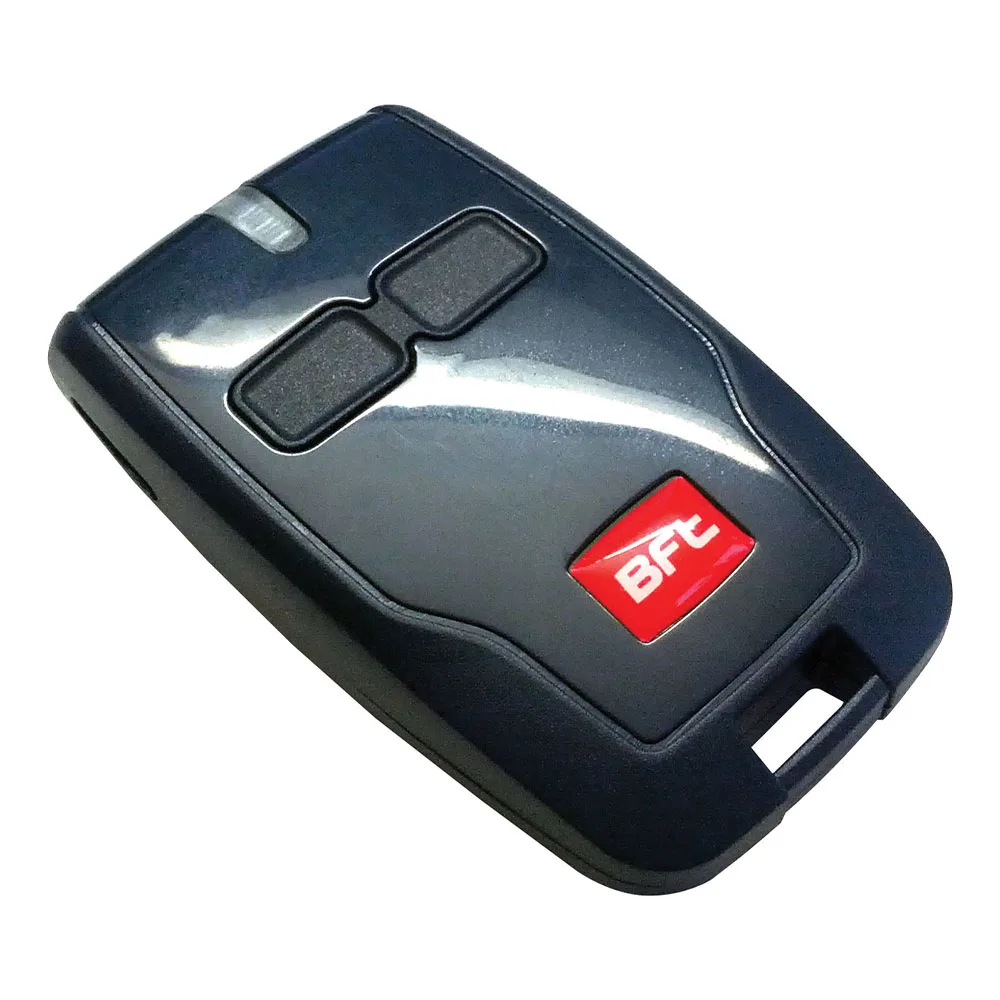
Remote BFT backup control: MITTO, MITTO COOL or KLEIO
A remote BFT backup control helps you when the main one gets lost, runs out of battery, or gets to another car. It's important to choose a model that's compatible with your receiver, with the right number of channels, and know how you memorize the automation correctly, step by step.
In short: MITTO, MITTO COOL and KLEIO work on 433 MHz with rolling code, in 2 or 4 channel variants, and store on the receiver.
Do you need help choosing?
Tell us what you need and we'll send you the offer on the same working day.
An additional remote control costs a little time to configure and saves you many roads. Check the old model and receiver, choose 2 channels for gates and garage or 4 channels if you have more automations, then store the transmitter on the receiver. The 433 MHz rolling code shall keep the access protected. See MITTO, MITTO COOL and KLEIO models in the remote radio control category and ask for team support for compatibility.
A remote BFT backup control relieves you of stress when the main remote control is lost, damaged or stayed in another car. However, not every remote control communicates with any automation. In this article, see how you choose between MITTO, MITTO COOL and KLEIO models and how you record the receiver.
Why a BFT remote reservation is worth
The remote control seems like a small accessory, but it depends on daily access to the yard or garage. For example, a late-night battery will leave you in front of the gate. So, a remote BFT backup control kept in the house immediately solves the problem. In addition, families with more drivers need more transmitters anyway. Moreover, a backup helps you and when a remote control stays at someone else's for a few days.
Available models: MITTO, MITTO COOL and KLEIO
All models in category remote radio controls work on 433 MHz with rolling code. For a remote BFT backup control, the differences are due to the number of channels and shape.
- BFT MITTO 2 has 2 channels and compact black shell.
- Version MITTO 4 offers 4 channels for multiple automations.
- MITTO COOL series, with models C2 and C4, keep the frequency and rolling code in a housing with a different design.
- KLEIO appears as B RCA02 R1, with 2 channels, and as B RCA04 R1, with 4 channels.
Code running at a remote BFT radio control
At every push, the remote sends a different code. The receiver recognizes the code and accepts it only once. Therefore, someone who records the signal cannot reset it to open gates. In other words, the rolling code protects against simple copying. At the same time, this mechanism explains why a remote BFT backup control should be stored on the receiver, not just copied.
Compatibility: what you check on a new BFT remote control
First, look at the old remote. The model name usually appears on the housing or on the back label. Then, identify the receiver or central automation. For example, receivers in the category radio receivers works on 433,92 MHz, just like the remote controls in the store. Instead, remote control on another frequency does not communicate with them at all.
If you have an older BFT automation, ask for a check before ordering. Thus, choose a remote BFT control from the first compatible backup. General information about equipment standards can be found at Standardisation Association of Romania.
How many channels need a remote BFT radio control
A channel usually corresponds to an order or an automation. Therefore, 2 channels reach for gates and garage door. Instead, 4 channels serve houses with gates, garage, barriers and possibly a light ordered by relay. The MITTO COOL C4 card even talks about control for up to 4 different equipments. So, if you keep buying a BFT remote backup control, take into account the automations you add later. For a fixed control on the wall, see and transmit modules.
Receptor memory, step by step
The procedure for a remote BFT backup control differs from the receiver and central. So keep the manual handy. In the big lines, the steps show as follows:
- Enter the learning mode, from the power station menu or with the receiver button.
- Press the desired key on the new remote until confirmation.
- Get out of the learning mode and test the command from the usual distance.
- Note which channel you saved each key.
Some BFT systems also allow cloning from a remote control already memorized. However, the method differs from one model to another, so check the instructions. In addition, the Clonix 2E AC U-LINK receiver stores up to 2048 remote controls, i.e. enough space for large buildings. Later, a remote BFT reserve control added so functions identical to the first.
One additional BFT remote control for each user
In a family, every driver usually has his own remote control. However, many forget visitors, babysitters or gardeners. For them, a remote BFT backup control with 2 channels arrives most times. In the case of a company, the situation is different. Employees change, and the record of issuers becomes important. Therefore, note to whom you gave each remote control and in what position from memory you saved it. Thus, you quickly erase the transmitter of a person leaving.
- Discreetly label each remote control.
- Keep a list of users and the date of storage.
- Keeps in the drawer a remote BFT backup control, ready to configure.
Watching the telecommand daily
The battery gradually drops, and the range of action decreases with it. Therefore, change the battery when you notice that you need to get a lot closer to the gate. Also, keep the remote off the water and heat on the side of the car during the summer. At the same time, a cracked housing leaves the moisture to reach the electronic plate. A remote BFT backup control held in the drawer consumes and it battery, so check it once a year.
Frequently asked questions about BFT remote backup control
What do I do if I lose the remote?
Delete the lost remote from the receiver memory, if the system allows. Then, memorize a remote BFT control of new backup.
Can I use MITTO COOL instead of an old MITTO?
Both work on 433 MHz with rolling code. However, confirm compatibility with your receiver before ordering.
How long does a remote control battery last?
The duration depends on how often you press. So, it changes the battery when the range of action drops visible.
How many remote controls can I memorize on a receiver?
Depends on the receiver. For example, Universal Clonix 2E stores 128 transmitters, and U-LINK variants reach 2048.
Choose the right model from the category remote radio controls, after the number of channels and the receiver you have. The BFT Store team helps you confirm that a remote BFT backup control fits your automation.